I still walk around with cash in my wallet. Not a lot of it, but enough to pay for at least a meal plus a drink. Where I live today, most people can get by their day with just their mobile phone. I’ve had friends lose their wallet and not realise until a few days later because they simply didn’t need it. If they misplaced their phone, it’d be a different matter, I’m sure.
Paying for stuff and giving other people money happens mostly digitally these days. Not a major deal these days, especially within a country. India has UPI, Brazil has Pix, the Southeast-asian countries have their own digital payment systems often tied to either a national ID or mobile number. Usually, within a country, these systems don’t incur extra fees. If I send my friend SGD10, my friend receives SGD10. Straightforward.
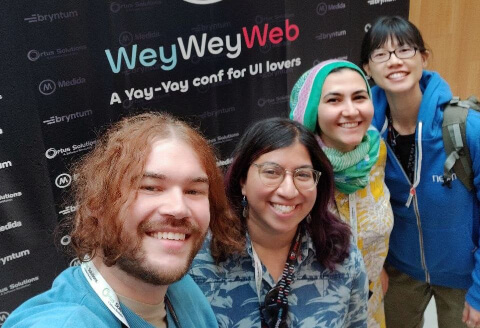
Things get more complicated when you’re dealing with cross-border payments. For myself, until 2023 when I ran into some friends I hadn’t seen in a while in Spain during WeyWeyWeb, we were still having trouble paying each other after a meal.
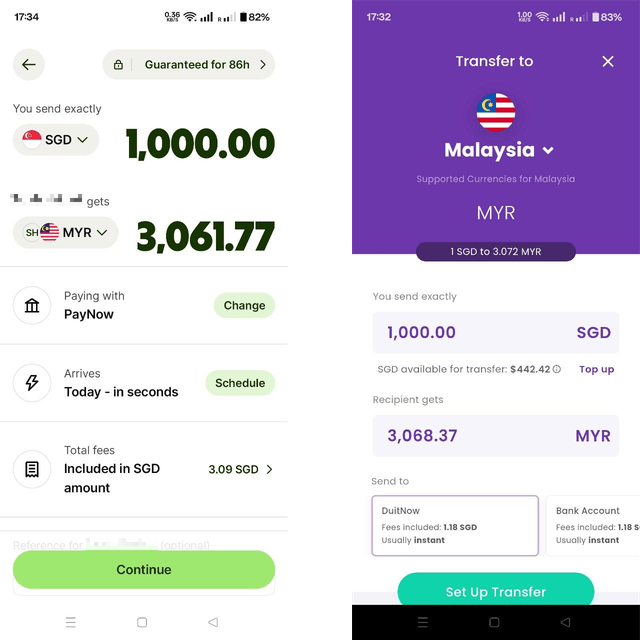
Cross-border payment interfaces
I think most people have heard of Wise, if you’re in Singapore, you might have heard of Youtrip. And I’m sure each region has their own preferred cross-border payment service of sorts.
Without going into the details of currency exchange, those of us who have had to handle multiple currencies would understand that fees are involved. Many fees involving different parties. I’m making a sweeping assumption that most people are not sure which part of the fees charged to us goes to who in the convoluted pipeline. But we know that the amount we pay is not the amount the recipient gets.
Honestly, I think most people don’t care, but they just want to know how much to pay to ensure the recipient gets the amount they had in mind. Wise and Youtrip use the same method. Depending on how much you actually want to pay or how much you actually want the recipient to get, the app just does the calculation for you.
Back when I worked for the Interledger Foundation, they were working on a wallet product of their own. I’m not sure how the real one looks like, but this is what the test version looks like. They went with an explanation tooltip.
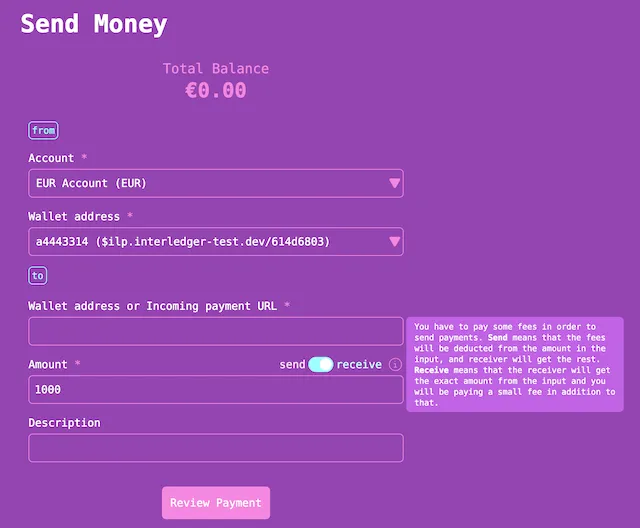
Cross-border is not what I’m trying to focus on here today, it’s more of the fees part of the interface. And how to make it clear that someone has to pay the fees, but the sender needs to decide who.
Some blockchain background
If you don’t care for blockchain or crypto, you can skip past the background straight to the interface design part.
My first experience of building anything with Circle involved something called the Cross-Chain Transfer Protocol (CCTP). If you’re unfamiliar with blockchain technology, the short version is that there are many different blockchains in existence, and value on one chain needs some sort of a protocol to be transferred (or bridged) onto a different blockchain. CCTP is the native solution for USDC.
There’s this thing called gas fees when you try to do anything on a blockchain, which are essentially transaction fees used to keep the network running. Most blockchains have a native currency (or token) that is used for this purpose.
So when you’re trying to bridge a stablecoin like USDC from one chain to another, you will need native tokens on both the source chain and the destination chain. This means holding 3 different cryptocurrency tokens across 2 different blockchains, yes, the UX of crypto is not the best.
Circle now provides a forwarding service for its crosschain interoperability solutions, CCTP and Gateway. It lets you not worry about native tokens for the destination gas fees by letting Circle take care of that part, and you just have to pay a small fee in USDC to use it.
So, a big part of my role is to test out our SDKs and APIs, mostly by building with them, then explaining to other people how they work. So I’ve built a big ole’ pile of sample applications for various products. When the forwarding service was released, I wanted to build it into a couple of my bridge applications.
Bridge interface design
To test out the forwarding service, I built the most barebones interface I could think of, practically no CSS other than spacing and some font size adjustments across the form elements. The thing I spent quite a bit of time thinking about was how to present the forwarding fee.
The fee is taken out of the amount the recipient gets, which means if you wanted your recipient to get say 10 USDC, you would have to take into account the forwarding fee amount as well. You would only know the fee after you hit “Estimate Fees”. If you just hit “Bridge USDC”, your recipient would get the amount less the fee.
I had thought about automatically adding the fee to the amount input but that was just a bad idea. Don’t mutate the user input automatically. That’s the conclusion I landed on. No, the fee should be tracked separately. Cue the <output> element. I’m so fond of the <output> element for no reason. But I put the fee amount there and added a checkbox for the user to decide if they wanted to cover the fee or not.
The next issue was now to label this checkbox. I had considered options like, “you pay” versus “receiver pays”, but that sounded weird. Eventually I settled on adding a “Recipient receives X USDC” note under the amount input, coupled with “Add on top” for the checkbox label. The <legend> for the <fieldset> was “Fees (USDC)” so I figured people could read it as adding the fees on top of the amount.
Now I had a more unconventional Bridge UI idea for a madlibs-style interface. This is by no means the recommended way to build a bridge application. At first, it was just a sentence, but then I realised I needed to add more and more elements just to make the logic work. Eventually, the SDK added even more features and now it looks absolutely stuffed. Oh well.
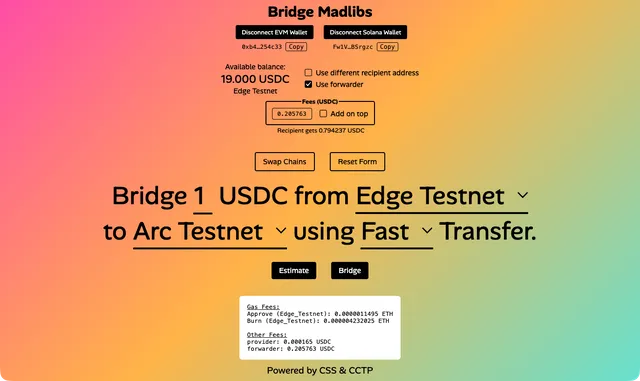
The interface itself was pretty fun to build. I had referenced Sara Soueidan’s technique for hiding and styling checkboxes and radio button, as well as used the field-sizing CSS property that is unfortunately not yet supported by Firefox at the moment. If you’re going to use a full-height gradient background, it might be a good idea to try background-attachment: fixed.
Wrapping up
Overall, it was an interesting thought exercise on how to convey a seemingly straightforward yet easy to misunderstand concept, on an interface that involved the transferring of value. Keeping in mind there is a high chance people will get upset if the amount transferred is not what they intended.
Anyway, if you’re interested in the source code for the styling as well as how the bridging logic is implemented, here are the CodePen links for the plain interface and the madlibs interface.
Stay safe out there, my friends.